 SolarPowerNerd


Solar keyboards for Mac use a thin photovoltaic strip across the top of the board to harvest light. In a well-lit office or near a window, that strip generates enough power to keep the keyboard running indefinitely without plugging in.
In dim rooms or spaces with mostly warm-toned LED lighting, output drops and the internal battery drains over days or weeks until a USB top-up is needed.
The other factor worth checking is the connection method. Bluetooth models pair natively with macOS without dongles, while some keyboards rely on a Logitech Unifying receiver or similar USB adapter that takes up a port.
Key layout matters too, since Mac users need dedicated Command, Option, and media keys rather than a generic Windows layout with reassigned shortcuts.
Below are 7 solar keyboards tested for Mac compatibility, indoor charging reliability, and build quality.
Quick Comparison Chart
| # | Product | Our Rating | ||
|---|---|---|---|---|
| 1 | 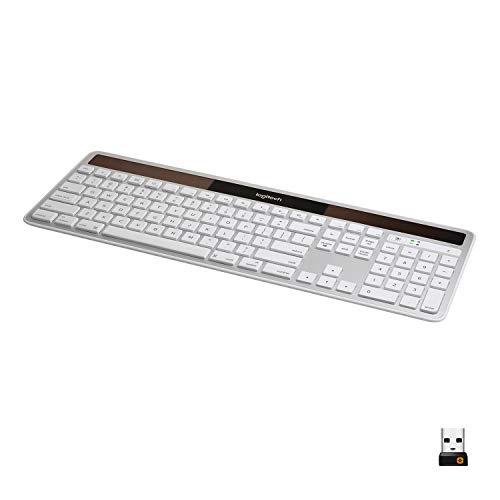 |
Logitech K750 Wireless Solar Keyboard for Mac | ★★★★★ | Check Price |
| 2 | 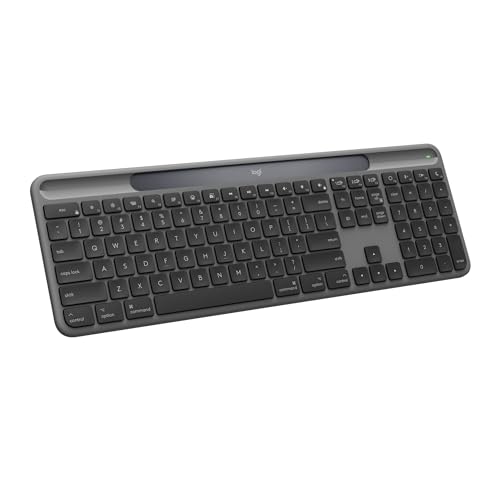 |
Logitech K980 Solar+ Keyboard for Mac | ★★★★★ | Check Price |
| 3 |  |
Logitech K760 Wireless Solar Keyboard | ★★★★☆ | Check Price |
| 4 |  |
Macally Dongle Wireless Solar Keyboard for Mac | ★★★★☆ | Check Price |
| 5 |  |
Logitech K750 Wireless Solar Keyboard for Mac (Renewed) | ★★★★☆ | Check Price |
| 6 |  |
Arteck Solar Wireless Keyboard | ★★★★☆ | Check Price |
| 7 | 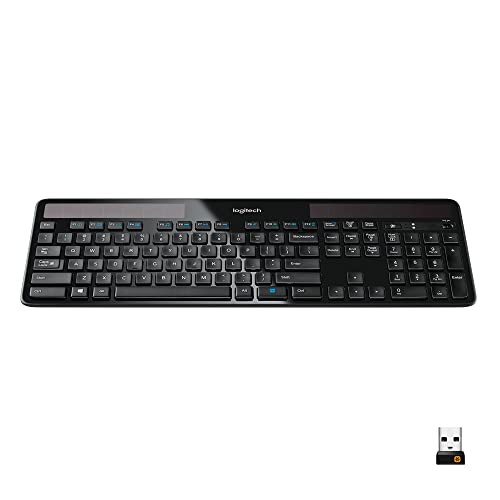 |
Logitech K750 Wireless Solar Keyboard for Windows | ★★★★☆ | Check Price |
What Actually Matters in a Solar Mac Keyboard
Indoor charging ability is the spec that matters most for a desk keyboard. The Logitech K750 runs three months in total darkness after charging from a lamp, while some cheaper boards need a window seat to stay alive.
Connectivity splits the list into two camps. The K760 and K980 Solar+ pair over Bluetooth and switch between Mac, iPad, and iPhone, but the K750 and Macally Dongle use a USB receiver that eats a port and skips the pairing hassle.
1. Logitech K750 Wireless Solar Keyboard for Mac
Logitech K750 Wireless Solar Keyboard for Mac
A slim, solar-powered Mac keyboard that charges from any light source and runs for three months in total darkness.
Pros
- Charges from any light source
- Only one-third inch thick
- Concave keycaps for quiet typing
- 2.4GHz wireless with Unifying receiver
- Full Mac layout with shortcuts
Cons
- No Bluetooth option included
- Requires Unifying USB receiver
The K750 for Mac measures 17.4 x 6.4 inches and sits just one-third of an inch off the desk. Two photovoltaic strips run along the top edge and charge from any light source, including a standard 60-watt desk lamp.
Logitech’s Solar App shows real-time charge level and light exposure data, so you know exactly when the keyboard needs more light.
The 2.4 GHz Unifying receiver plugs into a USB-A port and pairs with up to six Logitech peripherals through a single dongle. Wireless range reaches 30 feet.
The full Mac layout includes native Command, Option, and Brightness keys, so there is no remapping required.
Three months of typing in total darkness on a full charge means the K750 handles desk drawers and travel bags without losing power. Concave keycaps produce a quiet, low-profile feel, though they lack the sculpted travel of mechanical switches.
The solar powered option works well if you want a cable-free desk without any battery swaps.
2. Logitech K980 Solar+ Keyboard for Mac
Logitech K980 Solar+ Keyboard for Mac
Full-size Bluetooth solar keyboard for Mac with LightCharge technology that harvests solar and artificial light for up to 10 years of battery life.
Pros
- Charges from any light, even desk lamps
- Battery lasts up to 10 years
- Switches between Mac, iPad, and iPhone
- Smart Actions automate repetitive tasks
- 52% post-consumer recycled plastic
Cons
- Premium price point
- Requires Logi Options+ app for shortcuts
Logitech’s K980 is a full-size Bluetooth keyboard built specifically for Mac, and it is the successor to the K750 sitting at the top of this list. The headline feature is LightCharge, a charging strip that pulls energy from any light source, whether that is sunlight streaming through a window or a basic desk lamp on a cloudy afternoon.
Logitech rates the battery at up to 10 years before it needs replacing, which effectively means you never think about power again.
Bluetooth connects natively to Mac, iPad, and iPhone, and you can switch between all three with a tap. The Logi Options+ app adds Smart Actions, one-keystroke shortcuts for tasks you repeat throughout the day like launching apps or inserting text snippets.
The keyboard itself is built from a minimum of 52% post-consumer recycled plastic and is rated for 10 million keystrokes, so the build matches the battery longevity. The laptop-style keys sit in a slim, solid chassis that looks clean next to an iMac or MacBook dock.
3. Logitech K760 Wireless Solar Keyboard
Logitech K760 Wireless Solar Keyboard
A compact solar keyboard with Bluetooth switching between Mac, iPad, and iPhone, built with eco-friendly materials.
Pros
- Switches between Mac, iPad, and iPhone
- Charges from lamplight or sunlight
- Weighs only 0.82 pounds
- PVC-free recyclable construction
- Concave key design for precision
Cons
- Compact layout takes adjustment
- Bluetooth only, no USB receiver
The K760 connects to three Apple devices at once over Bluetooth and switches between them with dedicated device keys along the top row. You can type on your Mac, tap a key, and jump to your iPad mid-sentence without re-pairing.
At 0.82 pounds and 13.5 x 5.5 inches, the K760 is noticeably smaller and lighter than the K750. It drops the numeric keypad for a compact layout that fits easily in a laptop bag.
The concave key design matches the K750’s quiet, low-profile typing feel.
Logitech built the K760 with PVC-free, recyclable materials. The solar cells charge from any light, though the battery does not last as long in darkness as the K750’s three-month rating.
If your desk sits near a window or under decent overhead light, that difference rarely matters in practice.
4. Macally Dongle Wireless Solar Keyboard for Mac
Macally Dongle Wireless Solar Keyboard for Mac
A full-sized solar keyboard using a USB dongle for reliable wireless connection, with ergonomic tilt and Apple shortcuts.
Pros
- Simple USB dongle, no pairing needed
- 600 mAh battery lasts 150 hours
- Anti-slide grips with 10 degree tilt
- 21 intuitive Apple shortcuts
- LED battery and caps lock indicators
Cons
- Full size may feel bulky
- Requires available USB port
Macally’s dongle model uses a 2.4 GHz USB receiver instead of Bluetooth for its wireless connection. The dongle plugs in and works instantly with no pairing process, which can matter if your Mac’s Bluetooth radio is already managing multiple peripherals.
The 600 mAh battery provides 150 hours of dark runtime, and the island-style keycaps sit alongside 21 Apple shortcut keys. Anti-slide grips and a 10-degree tilt keep it stable, and LED indicators for Caps Lock and battery level sit on the top right corner.
The main trade-off is that the USB dongle occupies one port on your Mac, and you lose the ability to pair with an iPad or iPhone wirelessly. If you only use a desktop Mac and want zero pairing hassle, this version removes that friction.
5. Logitech K750 Wireless Solar Keyboard for Mac (Renewed)
Logitech K750 Wireless Solar Keyboard for Mac (Renewed)
A certified renewed version of the popular Logitech K750 solar keyboard with the same features and Mac compatibility.
Pros
- Same solar tech as the new K750
- Three-month battery in darkness
- Ultra-thin at one-third inch
- Concave keycaps for comfort
Cons
- Renewed condition varies slightly
- No original manufacturer warranty
This is a certified renewed unit of the same Logitech K750 Mac keyboard listed at #1. It uses the same photovoltaic cells, the same Unifying receiver, and runs the same three months in total darkness.
The concave keycaps and one-third-inch profile are unchanged.
The difference is cost and warranty. Renewed units typically sell for 20 to 40 percent less than new, but they ship without the original Logitech warranty.
Renewed units typically include a guarantee covering a replacement within 90 days if the product does not function as expected. Check the current terms on the product listing for details.
Cosmetic condition varies. Some units arrive looking untouched, while others show minor scuff marks on the bottom.
The solar cells and wireless connection work identically to a brand-new K750.
6. Arteck Solar Wireless Keyboard
Arteck Solar Wireless Keyboard
A full-sized solar keyboard with a stainless metal panel and six-month battery life, compatible with both Windows and Mac.
Pros
- Six-month battery in total darkness
- Stainless metal front panel
- Low-profile keys for quiet typing
- USB nano receiver for instant setup
- Works with Windows and Mac
Cons
- PC layout, not Mac-specific
- Heavier than compact keyboards
The Arteck holds the longest dark-mode battery life on this list at six months without any light exposure. Its stainless steel top panel gives it more weight and rigidity than the plastic-bodied Logitech and Macally boards, which reduces flex during fast typing.
The keyboard uses a Windows key layout, so Command and Option are labeled as Windows and Alt. macOS automatically remaps these, but the printed legends will not match. A USB nano receiver handles the 2.4 GHz wireless connection with no pairing required.
Arteck is a smaller brand compared to Logitech and Macally, but the keyboard’s low-profile scissor-switch keys and full-size layout with numeric keypad hold up well for daily office work. Cross-platform support means you can also use it with a Windows PC if you switch between machines.
7. Logitech K750 Wireless Solar Keyboard for Windows
Logitech K750 Wireless Solar Keyboard for Windows
The Windows version of the popular K750 solar keyboard, featuring the same solar charging and slim design with cross-platform support.
Pros
- Solar charges from any light source
- Three-month battery in darkness
- Ultra-thin one-third inch profile
- Pairs up to 6 Logitech devices
- Also works with Mac OS
Cons
- Windows layout, not Mac-native
- Requires USB port for receiver
This is the Windows version of the K750 that also works with macOS. It carries the same one-third-inch profile, the same photovoltaic strip, and the same three-month dark-mode battery as the Mac edition.
The Unifying receiver pairs up to six Logitech devices through one USB port.
The key difference is the printed layout. The Windows K750 labels keys as Ctrl, Alt, and the Windows key instead of Control, Option, and Command. macOS remaps these automatically, but you need to remember that the physical labels do not match the Mac functions.
This model ranks lower on the list because most Mac users prefer having the correct key legends. If you already own a Windows K750 and want to try it on your Mac, or if you split time between both operating systems, it works fine as a daily driver on either platform.
Final Thoughts
Logitech and Macally are the only two brands that make dedicated solar keyboards with real Mac compatibility, so your options are more limited than on the Windows side. The Logitech K750 for Mac remains the best overall pick because its solar cells charge from indoor light just as well as sunlight, and the keyboard can run for up to three months in complete darkness on a full charge.
The K980 Solar+ is the strongest alternative if you want multi-device Bluetooth pairing without a dongle. Its LightCharge strip works from any light source, and the battery is rated for up to 10 years, which puts it in a different league from the K750’s three-month reserve.
One thing to watch for is connectivity type. The K750 and Macally Dongle use a USB receiver that eats a port, while the K980 Solar+ and K760 pair over Bluetooth directly.
If your Mac has limited ports, that distinction matters more than you might think.
For a broader look at solar keyboards across all platforms, our best solar keyboard roundup covers Windows-compatible options alongside the Mac models listed here.