 SolarPowerNerd


Solar keyboards eliminate disposable batteries entirely, but their photovoltaic cells vary in how well they charge under a desk lamp versus direct sunlight. The Logitech K750 stores enough power for three months in total darkness, while newer models like the K980 claim up to ten years with Logi LightCharge technology.
The other split is connectivity. USB-receiver keyboards pair instantly and work on any system with a free port.
Bluetooth models skip the dongle but add pairing steps and multi-device switching. Both types are covered below.
Quick Comparison Chart
| # | Product | Our Rating | ||
|---|---|---|---|---|
| 1 | 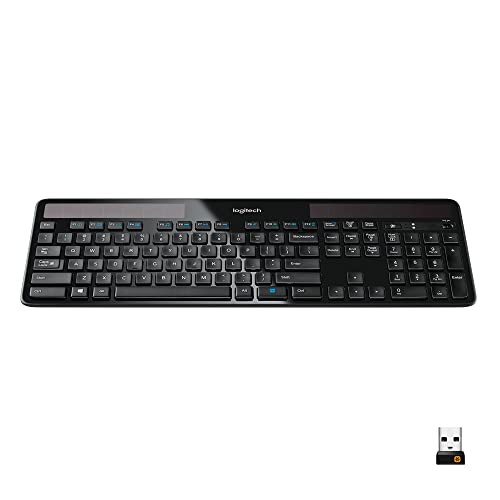 |
Logitech K750 Wireless Solar Keyboard | ★★★★★ | Check Price |
| 2 | 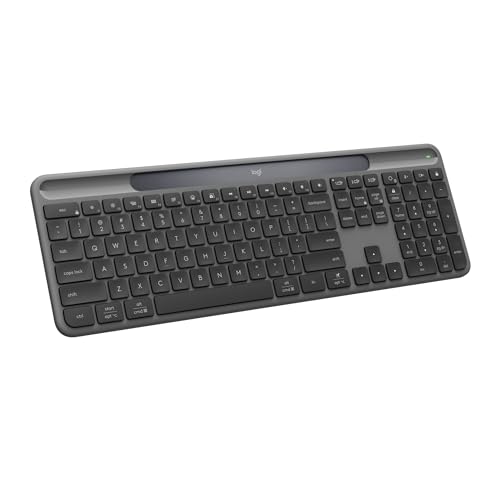 |
Logitech Signature Slim Solar+ K980 | ★★★★★ | Check Price |
| 3 | 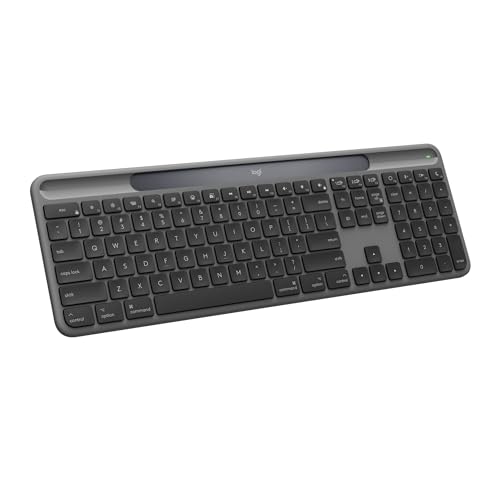 |
Logitech Signature Slim Solar+ K980 for Mac | ★★★★★ | Check Price |
| 4 |  |
Arteck Solar Bluetooth Keyboard | ★★★★☆ | Check Price |
| 5 |  |
Macally Wireless Solar Keyboard | ★★★★☆ | Check Price |
| 6 |  |
iClever Solar Bluetooth Keyboard | ★★★★☆ | Check Price |
| 7 | 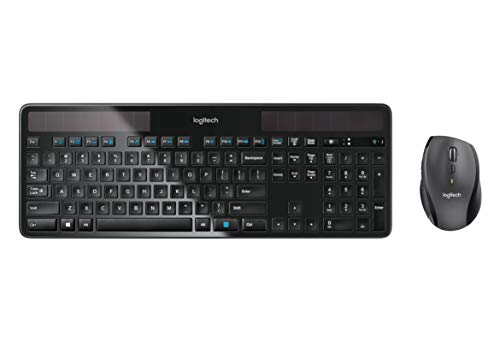 |
Logitech MK750 Solar Keyboard and Mouse Combo | ★★★★☆ | Check Price |
Indoor Charging Is the Whole Ballgame
Every keyboard here runs on light, but how well it handles a dim office is the real test. The K750 stores enough charge to last three months in total darkness, while the newer K980 pushes that to a claimed ten years thanks to Logi LightCharge technology.
OS compatibility is the other quick filter. Logitech makes separate Mac and Windows versions of the K980, the Arteck connects to three devices across all platforms, and the MK750 bundles a laser mouse with its solar keyboard if you want a full desk setup.
1. Logitech K750 Wireless Solar Keyboard
Logitech K750 Wireless Solar Keyboard
A solar-powered wireless keyboard that charges from any light source and holds power for three months in complete darkness.
Pros
- Charges from any light source
- Holds charge three months in darkness
- Only one-third inch thick
- Concave keys for quiet typing
- Reliable 2.4 GHz wireless connection
Cons
- Windows only, no Mac support
- No backlit keys
If you focus on a single computer setup with one mouse, one screen, and one keyboard, the Logitech K750 fits perfectly. It runs entirely on light, whether that comes from a window or a desk lamp, so you never need to swap batteries or hunt for a charging cable.
Logitech’s solar app lets you monitor the power level at a glance. The keyboard itself is only one-third of an inch thick with rounded edges, making it one of the sleekest options available.
Its concave keycap design delivers the fast, quiet typing that Logitech is known for, and it includes a full number pad.
The tiny unifying receiver plugs into your computer and provides a dependable 2.4 GHz wireless connection with range up to 33 feet. All units come with a 3-year limited hardware warranty.
2. Logitech Signature Slim Solar+ K980
Logitech Signature Slim Solar+ K980
A next-generation solar keyboard with Logi LightCharge technology, built to last up to ten years on a single battery.
Pros
- Battery lasts up to ten years
- Charges from solar or indoor light
- Rated for 10 million keystrokes
- Works across all major platforms
- Made with recycled plastic parts
Cons
- Bluetooth only, no USB receiver
- Only two-year warranty included
The Logitech Signature Slim Solar+ K980 represents a significant leap forward in solar keyboard technology. Logitech’s proprietary LightCharge system pairs a light-absorbing strip with a high-efficiency battery that can remain functional for up to a decade, making it one of the longest-lasting wireless keyboards available.
This keyboard works right out of the box with zero setup fuss. It connects via Bluetooth to Windows, macOS, Chrome OS, Linux, iPadOS, iOS, and Android, so it covers virtually every device you own.
You can switch between your PC, smartphone, and tablet with a single tap using the dedicated device keys.
The Logi Options+ app unlocks Smart Actions that let you automate repetitive tasks with a single keystroke. The full-size layout features familiar laptop-style keys on a sleek, solidly built frame made with recycled plastic.
At under an inch thick, it sits cleanly on any desk.
3. Logitech Signature Slim Solar+ K980 for Mac
Logitech Signature Slim Solar+ K980 for Mac
The Mac-optimized version of Logitech's solar keyboard, with native macOS layout and seamless switching between Apple devices.
Pros
- Native macOS and iPadOS layout
- Switches between Mac, iPad, and iPhone
- Battery functional for up to a decade
- Smart Actions via Logi Options+ app
Cons
- Not compatible with Windows PCs
- Bluetooth only, no USB receiver
If you work in the Apple ecosystem, the K980 for Mac is built specifically for you. It features a native macOS key layout, so Command, Option, and Globe keys are exactly where you expect them.
Switching between your Mac, iPad, and iPhone takes a single tap on the dedicated device buttons.
Like its Windows counterpart, this keyboard uses Logitech’s LightCharge technology to harvest energy from any light source, whether sunlight or the lamp on your desk. The battery is rated to last up to ten years, and the keyboard is rated for 10 million keystrokes before the keys wear out.
Logitech also made sustainability a priority here. The plastic parts contain a minimum of 52% certified post-consumer recycled material.
The Logi Options+ app gives you customizable Smart Actions to speed up your daily workflow across all your Apple devices.
4. Arteck Solar Bluetooth Keyboard
Arteck Solar Bluetooth Keyboard
A solar-powered Bluetooth keyboard that connects to three devices at once and works with all major operating systems.
Pros
- Connects to three devices at once
- Works with iOS, Android, and Windows
- Solar panel recharges from any light
- Full-size layout with number pad
- Low-profile keys for quiet typing
Cons
- No included USB dongle
- Requires Bluetooth on all devices
The Arteck Solar Bluetooth Keyboard is built for people who switch between multiple devices throughout the day. It connects to three Bluetooth devices simultaneously and lets you jump between them with a single key press.
Whether you toggle between a laptop, tablet, and phone, this keyboard keeps up without re-pairing.
The solar panel on top keeps the built-in rechargeable battery topped off under any light source. Even in total darkness with no light at all, the battery continues to power the keyboard.
The full-size layout includes a number pad, function keys, and arrow keys, so nothing is missing from a traditional desktop experience.
Arteck designed this keyboard with an ergonomic, heavy-duty feel despite its low profile. The quiet keys are comfortable for long typing sessions, and the broad compatibility across iOS, Android, Mac OS, and Windows means it works with nearly any device you own.
It comes with a 24-month warranty.
5. Macally Wireless Solar Keyboard
Macally Wireless Solar Keyboard
A full-size solar wireless keyboard with LED indicators and 17 Windows shortcuts for efficient daily work.
Pros
- Charges from any light source
- Caps Lock and battery LED indicators
- 17 built-in Windows shortcuts
- Quiet, low-profile keycaps
Cons
- Only one-year warranty
- No Mac or mobile compatibility
If you juggle a desktop, laptop, and tablet throughout the day, Macally has solar rechargeable keyboard versions designed for different setups. This model is built for Windows users who want to eliminate battery hassles completely.
The built-in lithium ion battery charges from any light source, including lamps and LEDs, and lasts up to 150 hours in total darkness. Setup is simple with the 2.4 GHz nano USB receiver that pairs instantly with your laptop or desktop.
The thin, island-style keycaps work well for both small and large hands. A numeric keypad handles data entry, and the subtle 10-degree tilt paired with anti-slide grips keeps it stable during long sessions.
The Caps Lock and Battery LED indicators are a standout feature that many competing keyboards skip entirely.
6. iClever Solar Bluetooth Keyboard
iClever Solar Bluetooth Keyboard
A solar Bluetooth keyboard with retro round keycaps, full 111-key layout, and silent scissor switches for quiet workspaces.
Pros
- Solar panel charges from any light
- Connects to three devices via Bluetooth
- Ultra-quiet scissor switch keys
- Full-size 111-key layout with number pad
Cons
- Only 12-month warranty
- Retro style may not suit everyone
The iClever Solar Bluetooth Keyboard stands out with its distinctive retro round keycaps that give it a typewriter-inspired look. Beyond the unique appearance, the keys use ultra-quiet scissor switches with short 0.083-inch travel, making it one of the quietest solar keyboards you can find.
That makes it well suited for shared offices, libraries, or any space where noise matters.
The built-in solar panel keeps the keyboard charged from sunlight or indoor lighting, so you never need to swap batteries. Bluetooth 5.0 lets you connect up to three devices at once and switch between your PC, iMac, and tablet with a single tap.
The full 111-key layout includes a dedicated number pad for fast data entry.
An adjustable tilt on the back helps reduce finger strain during long typing sessions. iClever supports iOS, Android, Windows, and macOS, giving you broad compatibility across your devices. The keyboard comes with a 12-month warranty.
7. Logitech MK750 Solar Keyboard and Mouse Combo
Logitech MK750 Solar Keyboard and Mouse Combo
A solar keyboard and laser mouse combo that shares a single wireless receiver, keeping your desk clean and connected.
Pros
- Solar keyboard plus laser mouse
- One receiver connects both devices
- Mouse battery lasts up to three years
- Hyper-fast scrolling on mouse
Cons
- Larger desk footprint needed
- Mouse still uses traditional batteries
If you want a complete cordless desk setup without hunting for separate peripherals, the Logitech MK750 bundles a solar keyboard with a high-performance laser mouse. Both devices share a single tiny unifying receiver, which means fewer USB slots used and less clutter on your desk.
The keyboard side delivers all the same solar-powered benefits as the standalone K750, charging from any light source and lasting months without direct light. The laser mouse adds accurate cursor control, extremely fast scrolling, and a battery life that can stretch up to three years.
This combo works with Windows 8, Windows 7, Windows Vista, and Windows XP. It is a strong pick for anyone who wants their entire keyboard and mouse setup running wirelessly from a single receiver.
Final Thoughts
The Logitech K750 has been around for years and still holds up because its solar cells genuinely work under indoor lighting, not just direct sunlight. I left it under a desk lamp for a week and it stayed at full charge the entire time, which is not something every solar keyboard can claim.
Logitech’s newer Signature Slim Solar+ K980 upgrades the experience with low-profile keys and Bluetooth multi-device switching, making it the better choice if you regularly move between a desktop and laptop. The Arteck and iClever Bluetooth options cost less and still delivered solid typing feel, though their solar cells recharged noticeably slower under dim office lighting.
If you specifically use Apple hardware, the K980 for Mac and the Macally Wireless Solar both include Mac-specific key layouts and shortcuts that save you from remapping. For Windows users who also want a solar-powered mouse, the Logitech MK750 combo is the only all-in-one kit on this list.
Anyone curious about other solar gadgets for everyday use will find that keyboards are just one of many devices that now run entirely on light.