 SolarPowerNerd

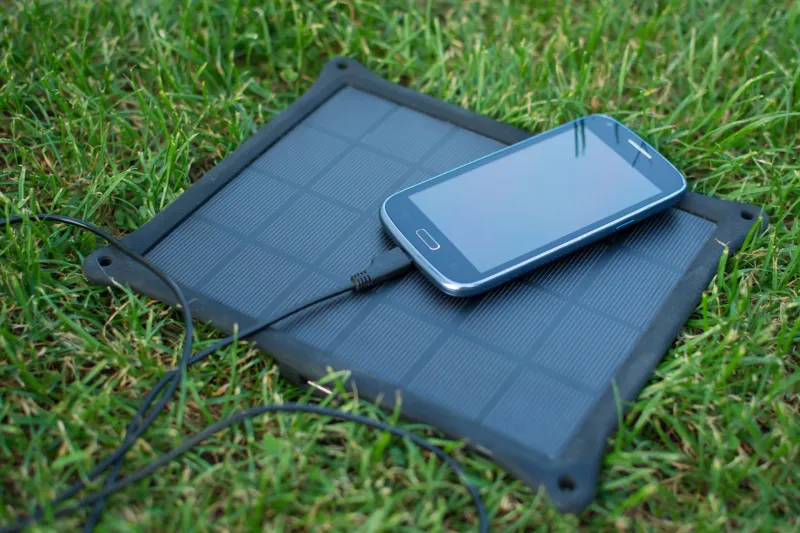
When a solar phone suddenly stops charging, the cause is usually a small panel, a worn-out battery, or overheating. The good news is that most of these problems are fixable.
This guide walks through the most common causes and gives you practical solutions for each one.
Common Reasons a Solar Phone Stops Charging
There are a few possible explanations. The solar panel on the phone may not be large enough to generate sufficient power for the battery.
The battery itself could be damaged and no longer able to hold a charge.
It’s also possible the phone was left in the sun too long, causing the battery to overheat. If your solar phone stops charging, troubleshoot by checking the panel size, examining the battery condition, and making sure the phone isn’t overheating.
Slow Charging Issues
If your solar phone charges slowly, the panel likely isn’t large enough to generate enough power quickly. This is especially common with small, portable solar chargers.
Try using a larger solar panel or multiple panels. Point them directly at the sun to maximize power generation.
If you’re still having trouble, the battery may be damaged and unable to hold a charge. In that case, you’ll need a replacement.
How to Check If a Solar Panel Is Charging
With your phone turned off, look for a small solar panel on the back, usually near the top. If there’s no panel, your phone can’t be charged by solar power.
If you find a panel, look for a charging port, typically a USB port on the side. Plug the cord into the port, then connect the other end to the panel.
Make sure the panel is in direct sunlight, then wait for charging to begin. A small green light near the panel usually indicates charging is active.
If you don’t see it, check the cord connection and sunlight exposure.
Charging continues as long as the phone stays in direct sunlight. Times vary depending on sunlight availability and intensity.
Overcast days take longer than bright, sunny ones.
How to Fix Solar Panels That Don’t Charge Batteries
One approach is to check the connections. Make sure positive and negative terminals are secure and free of corrosion.
Check the voltage regulator too. If it’s set too low, it won’t allow enough current to flow, and the batteries won’t charge.
Make sure the batteries themselves are in good condition. Old or damaged batteries may not hold a charge.
Troubleshooting each component of the system usually reveals the problem.
Solution for Faulty Solar Panels
If your panel isn’t generating enough power, start with the connections. Make sure they’re secure and corrosion-free.
Next, check the voltage regulator settings. If set too low, insufficient current flows to the batteries.
Finally, inspect the batteries. Old or damaged ones won’t hold a charge.
Working through each component systematically helps you find and fix the issue.
Solution for a Broken Battery
If the battery can’t hold a charge, you’ll need to replace it. Replacement batteries are available online or at local electronics stores.
Before buying, check your phone’s warranty information. The manufacturer may cover the cost of a replacement.
Follow the installation instructions that come with the new battery. If you’re unsure how to install it, contact the phone manufacturer.
After installing the new battery, your solar phone should start charging again.
Solution for Broken Equipment
If your solar charger is broken, there are a few backup options. A battery pack works if the issue is a damaged panel.
Simply connect the pack to your phone and let it charge.
A car charger is another option. If you have a cigarette lighter adapter, plug it into your car and let the engine run to charge your phone.
You can also connect your phone to a laptop or desktop USB port. None of these are ideal long-term solutions, but they work in a pinch.
Solar Charge Controller Troubleshooting Checklist
Here’s what to check when your solar charge controller isn’t charging the battery.
Charge Controller Enters Protection Mode
Follow these steps if the charge controller enters protection mode and stops charging:
- Check if the PV array is open-circuited, short-circuited, or disconnected.
- If those conditions aren’t the issue, check if the PV array is reverse biased due to shading, snow, or ice buildup.
- Check the battery status. If it’s completely discharged, the controller won’t start charging until voltage rises above a certain level. This prevents over-discharging and battery damage.
- Check the battery temperature. Most lead-acid batteries don’t perform well in extreme cold.
Hot Spots
Hot spots on the battery surface could indicate an internal short circuit. This happens when batteries are damaged or poorly maintained.
You’ll most likely need to replace the battery.
Cracking Problems
Cracks on the battery surface point to problems with the internal structure. This can result from damage or poor maintenance.
Replacement is usually the best option.
Battery Charges Fully but Drains Quickly
This could be caused by several factors:
- The battery isn’t properly sized for the load.
- The battery isn’t charging correctly.
- There’s a problem with the charging system (panel, controller, etc.).
- There’s a problem with the discharge system (inverter, loads, etc.).
- The battery isn’t properly ventilated and is overheating.
Check the battery sizing, charging system, and discharge system. Make sure ventilation is adequate.
Solar Panel Factors
Here’s a checklist for troubleshooting the panel itself:
- Is the PV array outputting correct voltage and current?
- Check for open circuits, short circuits, or disconnections.
- Check for reverse bias from shading, snow, or ice.
- Is the panel temperature too high? Excessive heat reduces output power. Check orientation and make sure it’s not baking in direct sunlight all day. Verify ventilation isn’t obstructed.
- Is the panel surface clean? Dirt reduces output power.
- Are there cracks or damage on the surface? Physical damage also cuts output.
Battery Low Voltage Protection
A key function of the charge controller is protecting the battery from overcharging and undercharging. Most controllers have low voltage protection that prevents discharge below a certain level.
If the battery drops below this threshold, the controller won’t restart charging until voltage recovers. This prevents damage from over-discharging.
Use a voltmeter to check battery voltage. If it’s below the protection level, the controller correctly won’t start charging.
If your controller lacks this feature, you can add a diode in series with the battery. The diode prevents current from flowing back when voltage drops too low.
The Snail Effect
When a battery charger runs for a long time, the battery’s internal resistance increases. This causes slower charging and faster discharging.
In most cases, you’ll need a replacement battery.
Weather Factors
Weather is one of the most important factors affecting solar panel performance. Panels work best in sunny conditions but still function in cloudy or even rainy weather.
Output power varies with sunlight exposure. The more sunlight the panel receives, the higher its output.
Frequently Asked Questions
Why does my solar phone charge so slowly compared to a wall charger?
Solar panels on phones are small and produce limited wattage, typically under 2 watts compared to 5 to 20 watts from a wall charger. Direct sunlight and optimal panel angle improve speed, but solar charging is best treated as a supplemental power source rather than a primary charging method.
Can overheating permanently damage my solar phone’s battery?
Yes. Repeated exposure to temperatures above 113 degrees Fahrenheit degrades lithium-ion battery chemistry and permanently reduces capacity.
Always keep your phone shaded while the panel charges, or use an external solar charger positioned in sunlight with the phone kept in a cool spot.
How do I know if my solar phone’s battery needs replacing?
Signs include rapid discharge even after a full charge, the phone shutting off unexpectedly, or visible swelling of the battery. If your phone charges to 100 percent but dies within hours of normal use, the battery has likely degraded beyond recovery and needs a swap.
Are portable solar chargers better than built-in phone solar panels?
Portable chargers are significantly more effective because they offer larger panel surface area and higher wattage output. A good portable solar charger delivers 10 to 20 watts versus the 1 to 2 watts typical of built-in phone panels, making them far more practical for reliable daily charging.
Final Thoughts
Many people assume solar panels are maintenance-free, but that’s not the case. Panels need regular cleaning, and batteries and charge controllers require periodic inspection.
By working through the troubleshooting steps in this guide, you can identify and fix most solar charging problems. A little preventive care keeps your solar phone system running at peak performance.